

FAQ
Quick answers about the app, cameras, network and detectors. Can’t find what you need? Call us.
What is VIAS?
VIAS is a single system made of a control panel and wireless peripherals. Security and automation devices talk wirelessly over the U-Net protocol, while cameras connect over WiFi or ethernet. Everything is controlled from the VIAS app: alarm, video and automation.
Is the system certified?
Yes. The control panel and security accessories are built to EN50131 Grade 2.
Does VIAS work without internet?
Yes. You can connect to the system over local WiFi too. With or without internet, the system keeps working. With internet, you have access from anywhere.
What happens during a power cut?
The control panel has a built-in rechargeable battery (LiPo, over 12 hours) that keeps every function running. The system notifies the owner about the power cut or if a sensor is unavailable.
Can it connect to a monitoring centre?
Yes, through the SIA DC-09 protocol over IP. The standard ensures compatibility with most monitoring centres.
I already have a wired alarm or detectors. Can I keep them?
Yes. The SA203 module (3 in / 3 out) integrates an old panel or wired devices into VIAS. The SA204 transmitter and the SA202 sensor accept wired detectors from other brands.
What if I need to replace the control panel?
The cloud service keeps a backup of the configuration: automatically every week and manually whenever you want. With it you restore all data to the new panel quickly. The owner, supervisor or installer can make a backup.
I have a pet. Will it trigger the alarm?
Choose a pet-immune detector: the SV201/SV202 PIRCAMs and the SP221 dual-tech detector ignore animals up to 27 kg. The outdoor SP222 goes up to 45 kg in low mounting. The system builder suggests them automatically.
Why don't I have permission to edit users?
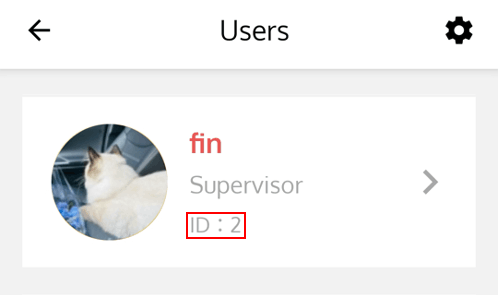
When you add a panel from the VIAS app (+gateway) you choose a role: "I'm a user" to become supervisor or "I'm an installer". At the initial installation you become the owner (admin) and the system has only one owner. Only the owner can add or delete users. When the installer adds the gateway, he is the owner until he adds a user to hand ownership over to the customer. In the Users list (Menu top left → Users) the owner is marked red and the installer green. The factory default admin has ID 1 and users start from ID 2.
Will the connection switch to SIM if LAN is lost?
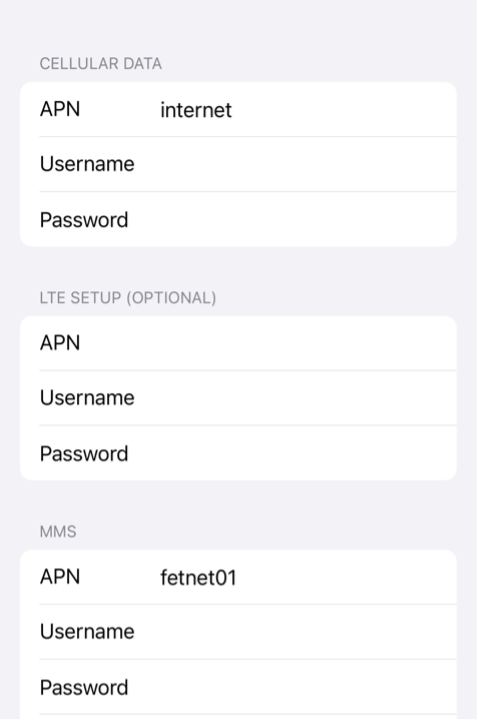
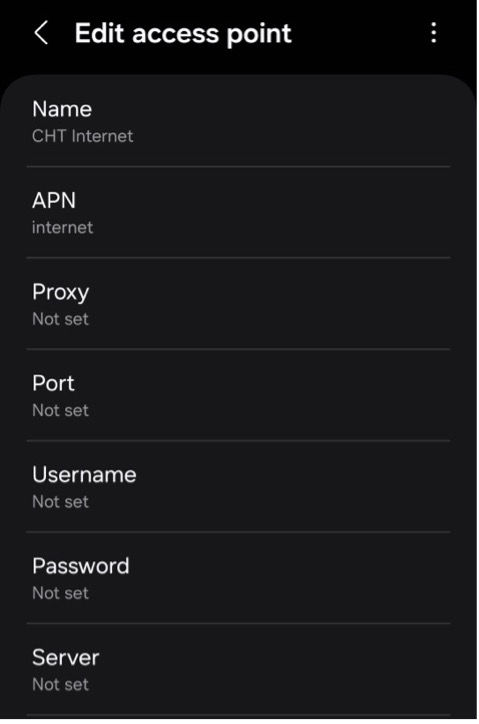
When LAN is lost, the system sends a notification that the gateway is offline and then that it is online via LTE. Make sure the APN is set in advance (Menu → Gateway configuration → Modem → APN). When the network switches to the SIM card, the gateway LED turns red.
Where do I find the APN settings?
See the app screenshots below:
Why can't the gateway read the SSD/HDD or SD card?
For the first installation of an SSD/HDD or SD card, power the gateway off completely and remove the backup battery. The gateway normally checks the disk format so that it is ready for recording, so it works with different SSD/HDD types. Format the SD card as a single FAT32 or exFAT partition.
How do I make sure the PIR detects movement?
Use START WALK TEST on the Sensor information page. If the PIR does not detect movement, follow the mounting position suggested in the PIR manual.
How does automatic camera search work?
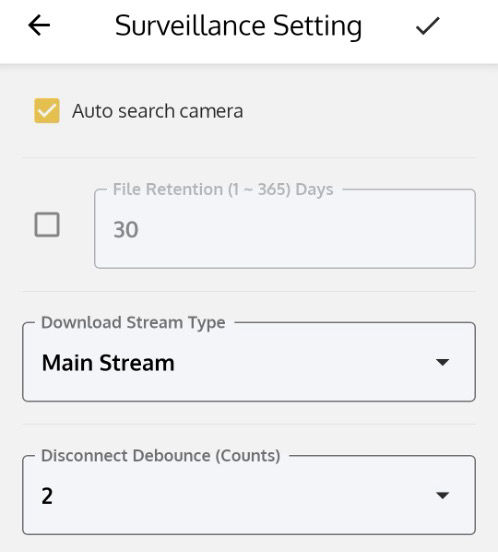
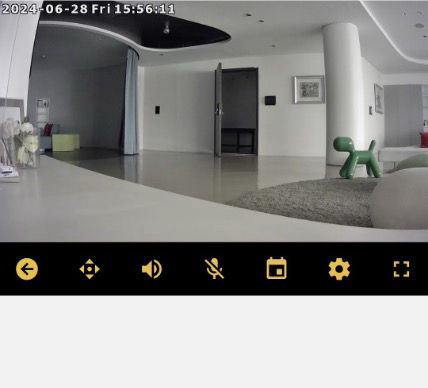
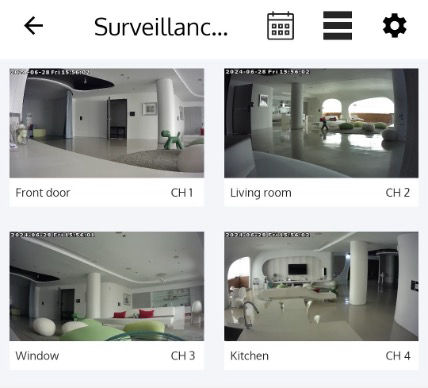
Auto search (Dashboard → Surveillance → View all → gear icon top right) is on by default. The app finds cameras on the same network when you tap the + camera icon in the surveillance list.
What can I set on the surveillance settings page?
Auto camera search: add cameras on the same network. File retention: how many days videos are kept, as long as the disk is not full (when full, older recordings are overwritten). Download stream type: main or sub stream for downloads. Disconnect debounce: a disconnection is logged if consecutive reconnection attempts fail.
Why can't VIAS find the cameras on my network?
Make sure the cameras are on the same network as the panel. On some brands, such as Hikvision and Dahua, ONVIF is disabled by default: enable it following the camera manual. Single-channel view uses the main stream and multi-channel view the sub stream.
Can VIAS devices be controlled by HomeKit or Google Home?
Yes, with Apple HomeKit: VIAS automation devices can be controlled from Apple’s Home app and by voice with Siri. Google Home support is coming soon.
Why didn't the flood detector retrigger?
When water is detected, the orange LED flashes for one second every minute. If the flood continues, it restores and retriggers after one minute.
Why can't I add the SA202 to the gateway?
Check the DIP switches on the SA202: it may be in test mode. Switch it to normal mode to add it.
No answer found. Please contact us.